

Inter Smart
Talk to our expert today

A client once called us in full panic mode.
Their big product launch was already live, but the social posts that were supposed to drive traffic were a full week late, costing them nearly 30% of potential site visits..
Turns out the social media team had been waiting on the design team, the design team was waiting on copy approval,
By the time everything got sorted, competitors were already trending with their own campaigns.
……………………………………………………………………………………………………………………………………………………
Stories like this pop up all the time in marketing.
On Reddit, one marketer admitted they got fired because they didn’t know how to work with a content calendar.
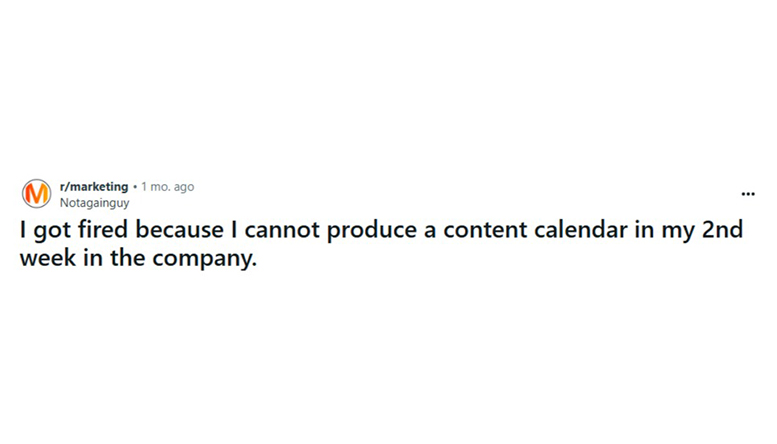
Marketer discussing content calendar struggles on Reddit
Others said their calendars fall apart after a month because there’s no system to keep things moving.
That’s the real problem. Most businesses treat a content calendar like a simple checklist, but in reality, it’s more like a workflow. If the workflow isn’t clear, deadlines pile up, approvals get messy, and posts lose their impact.
In this guide, we’ll walk through how to create a content calendar that holds up in real business conditions. One that helps campaigns launch on time, keeps teams in sync, and ties directly back to business goals by the best social media marketing companies in UAE.
Posting randomly might work for an individual creator, but businesses don’t have that luxury. Every post needs to serve a bigger purpose.
A content calendar brings three major benefits:
Instead of chasing trending hashtags, posts can support campaigns, launches, and sales cycles.
When tasks and deadlines are clear, marketing, design, and leadership stay on the same page.
No more long silences followed by frantic bursts of content. A calendar smooths out the peaks and gaps.
One of our clients, a B2B company, used to post only when inspiration struck.
Engagement was low, and their LinkedIn page felt like an afterthought. Once we introduced a structured calendar tied to product updates and customer stories, their post frequency doubled, and engagement followed. Within three months, LinkedIn was their second-best channel for qualified leads.
That’s the difference a calendar can make.
Even with the best intentions, many teams struggle to keep their social media organized. Without a clear plan, responsibilities, and feedback, content calendars can quickly fall apart. Here are the pitfalls to watch out for.
Many teams jump straight into scheduling posts without asking, “What are we trying to achieve?” Without clear goals, a calendar is just a prettier to-do list.
A lot of businesses still depend on one person to keep everything straight. If they get busy or leave the company, the whole process falls apart.
Who writes the copy? Who designs the creative? Who approves it? If that isn’t defined, deadlines get missed.
A calendar without feedback is just busywork. If posts don’t tie back to performance data, you’re just filling slots instead of learning what works.
Here’s how a Reddit user clearly points out how to keep things in check.

Before touching a template, define what success looks like.
Clear goals keep your calendar focused. They also make it easier to get leadership buy-in since you’re tying social to business impact, not vanity metrics.
Content pillars are themes that guide what you post. For B2B companies, they often look like this:
This balance keeps content diverse without drifting off-brand. It also prevents calendars from turning into endless promotions, which audiences quickly tune out.
Not every platform deserves your attention. Many businesses spread themselves too thin.
Look at where your ideal customers actually spend time. For a B2B company, LinkedIn usually deserves priority. Twitter/X works well for fast updates and industry conversations. Instagram can support brand storytelling if visuals are strong.
Pick two or three core channels and do them well before expanding.
This is where most businesses trip. A calendar is only as strong as the workflow behind it.
Here’s a simple structure that works:
When each step has an owner and a deadline, things move smoothly.
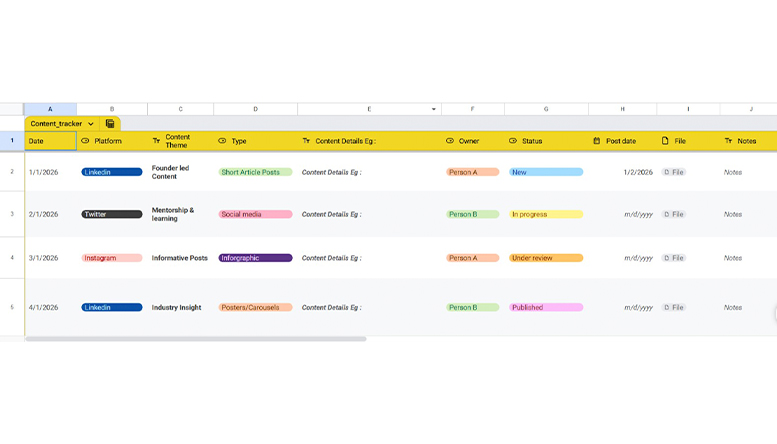
A sample social media calendar workflow
This is where templates and tools come in. A static Excel sheet can work, but most businesses benefit from tools that allow collaboration.
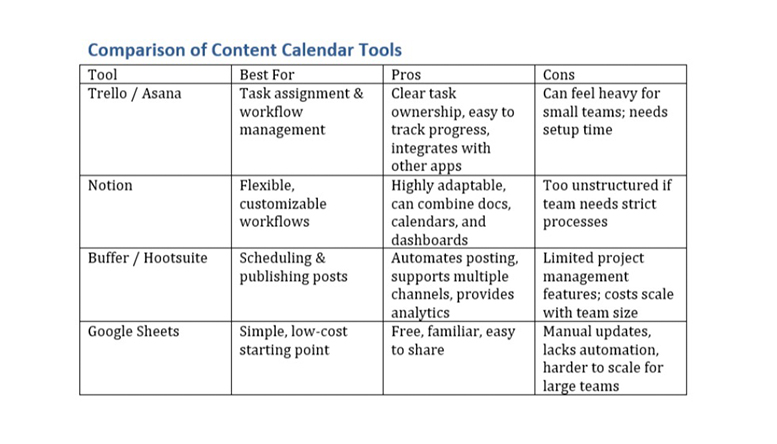
You don’t need to buy every tool on the market. Start simple, then upgrade when your workflow matures.
The best calendar is one that survives beyond the first month. A few habits help with that:
This is how you avoid the burnout that so many Reddit users complained about when their calendars collapsed.
To know if your content is working, here are some things you can track:
Organic KPIs help you measure how well your regular, non-paid content is connecting with your audience and building long-term brand value.
Tracks how consistently content is published during a given period.
Shows how many unique users have seen your content organically.
Indicates how often your posts were viewed. Higher views suggest better visibility.
Includes likes, comments, shares, saves, and reactions. This reflects how engaging your content is.
Calculated based on interactions versus reach or views. This helps assess content quality rather than just visibility.
Shows the total audience size at a given point in time.
Measures how fast your audience is growing due to organic content efforts.
Organic KPIs are especially useful for evaluating content themes, posting frequency, tone of voice, and audience preferences.
Paid KPIs focus more on performance, efficiency, and goal completion. These metrics help justify ad spend and optimise future campaigns.
Used to track individual ads or promoted posts across platforms.
Clearly identifies whether the content is boosted or fully paid.
Tracks how much is spent on each campaign or content piece.
Defines whether the campaign is aimed at custom audiences, lookalike audiences, interests, or demographics.
Measures how long the campaign runs, helping compare short-term vs long-term performance.
The primary objective such as reach, traffic, leads, app installs, or sales.
Shows how many people clicked on the ad link compared to those who saw it.
Tracks actions like sign-ups, downloads, enquiries, or purchases.
Paid KPIs help identify which creatives, messages, and audience segments deliver the best return on investment.
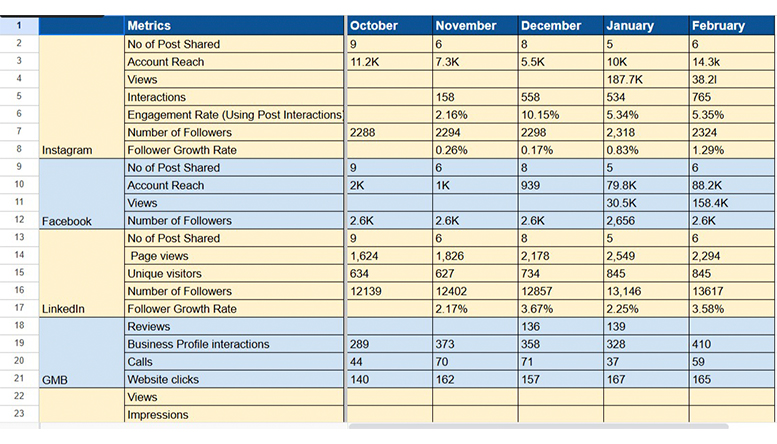
Tracking both organic and paid KPIs together provides a complete performance picture. Organic data helps refine content strategy and brand storytelling, while paid data supports faster growth, targeted reach, and measurable business outcomes. Reviewing these metrics regularly allows teams to improve future content, allocate budgets better, and build a social media calendar that truly delivers results.
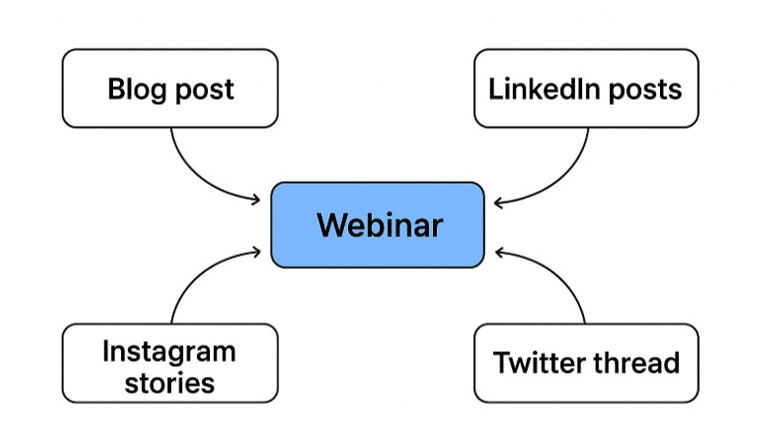
One post doesn’t have to stand alone. A single piece of content can fuel multiple posts across channels, saving time while maximizing reach. Here’s how:
By repurposing strategically, you get more mileage from the same effort—and keep your content calendar full without burning out your team.
Stop letting posts slip through the cracks. Build a content calendar that keeps your campaigns on time, your team aligned, and your results measurable.
Connect with our social media optimization dubai experts and see your campaigns run like clockwork!
Need tailored guidance or have specific questions? Simply request a callback, and one of our knowledgeable experts will reach out to you at a time that suits your schedule.