What Makes a Good Website Homepage? 12 Essential Elements
- October 22, 2026
- Post By: Alex Mariyan Sebastian

A good website homepage helps visitors understand what your business offers, find what they need, and decide what to do next. It should clearly communicate who you are and what you offer, why you should be trusted, and guide visitors toward valuable actions.
That might mean checking your services, portfolio, or requesting a quote or consultation. Whether you run a service-based business, an online store, or a large organization, your homepage often serves as the starting point for exploring your website.
But what makes a homepage effective? It is not just about attractive visuals. The content, layout, navigation, loading speed, mobile experience, and calls to action all need to work together.
This guide explains the essential elements of a good website homepage, practical ways to evaluate them, and considerations for businesses planning a website redesign.
Great homepages immediately inform visitors about what a business does. They should also direct visitors to the right next step and load quickly across multiple devices. Simple steps can help establish a strong website foundation and build trust.
What should a homepage communicate in the first few seconds?
When someone lands on your homepage, they should be able to understand three things quickly:
- What you offer: The products, services, or solutions your business provides.
- Who you serve: The audience your products or services are intended for.
- What to do next: The action visitors can take to explore your offering or contact your business.
The hero section/banner section, which appears at the top of the homepage, is an important place to communicate this information.
A clear headline, a short supporting description, and a relevant call to action can help visitors understand your offering without searching through multiple sections.
For example, instead of using a generic headline such as “Welcome to Our Website,” a Digital Marketing company could use:
Headline: Digital Marketing That Helps Your Business Grow
Supporting text: Explore our Digital Marketing solutions tailored to your business goals.
Primary CTA: Discuss Your Project
This example shows how specific messaging can communicate an offering more clearly than a generic welcome message. Your actual headline should reflect your services, audience, and value proposition.
12 Essential Elements of a Good Website Homepage
1. A Clear Value Proposition
Your value proposition explains what your business offers, who it helps, and why it matters to your intended audience.
Visitors shouldn’t have to interpret vague headlines or read several paragraphs to understand what your business does.
To improve your value proposition:
- Use straightforward language that your target audience understands.
- Explain the main benefit of your product or service.
- Avoid unsupported claims such as “the best company” or “the ultimate solution.”
- Support important claims with relevant evidence wherever possible.
Example: A software company might explain that its platform helps small businesses manage customer inquiries and sales activities in one place.
The goal is to make the offering understandable, not to fit every detail of your business into the headline.
2. Clear and User-Friendly Website Navigation
Navigation gives the website a structure. It helps people move between sections and pages without searching through the entire site.
For many business websites, the main menu might include About Us, Services, Our Work, and Contact. An online store may prioritize product categories, while an educational website may need a different structure.
A practical navigation structure should:
- Use labels that clearly describe the destination.
- Prioritize the pages visitors are most likely to need.
- Group related information logically.
- Avoid unnecessary menu items and confusing dropdowns.
- Remain usable on mobile devices.
The right structure depends on the website’s purpose and how many pages visitors need to access. There is no universal rule that every website should have a particular number of menu items.
Sticky navigation can be useful on longer pages or websites where visitors frequently move between sections, but it is not essential for every design. Test whether it improves access without taking up too much screen space.
3. A Logical Visual Hierarchy
Visual hierarchy determines how visitors notice and process information on a page.
Headings, font sizes, spacing, contrast, imagery, and button placement help communicate which elements matter most.
A homepage with too many competing headlines, equally prominent buttons, and crowded sections can make it difficult for visitors to identify the main message.
To improve visual hierarchy:
- Give the main headline sufficient prominence.
- Separate content into clearly defined sections.
- Use consistent heading styles.
- Make primary actions easy to identify.
- Use whitespace to distinguish related and unrelated information.
Each section should have a clear purpose. Decorative elements should support the content, not distract from it.
4. Relevant, High-Quality Visuals
Images, illustrations, product photographs, and videos can help visitors understand your offering and create a more recognizable brand experience.
However, visual quality alone is not enough. Images should be relevant to the business and appropriate for the information being presented.
Consider the following:
- Use real product photographs, project screenshots, or team images.
- Choose imagery that reflects your brand and target audience.
- Crop images appropriately for different screen sizes.
- Compress images without compromising their quality.
- Provide descriptive alternative text for meaningful images.
- Avoid using decorative visuals that add weight without improving the experience.
For example, a web design agency can use screenshots of completed websites to demonstrate its work more effectively than relying entirely on generic office photographs.
5. Fast Loading page and Strong Core Web Vitals
Homepage performance affects how quickly visitors can see and interact with your content. A slow or unresponsive page can make it harder for people to complete their intended tasks.
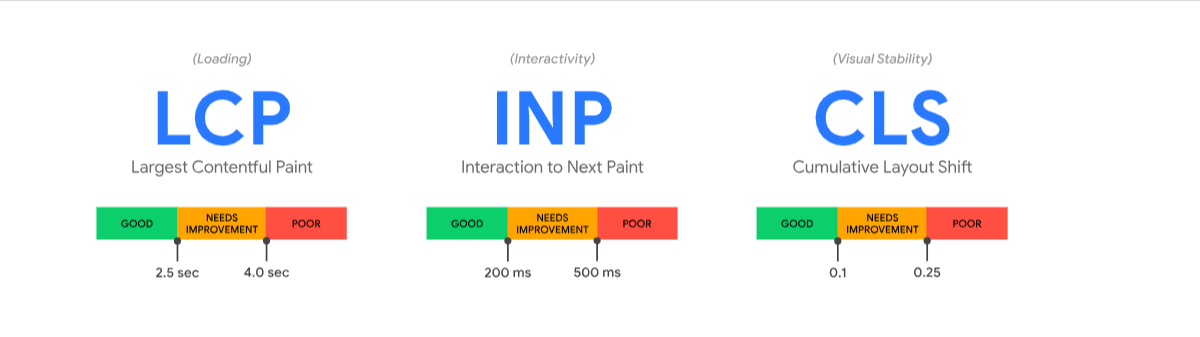
Google uses Core Web Vitals to assess key aspects of a webpage’s user experience, including loading performance, responsiveness, and visual stability. A slow-loading homepage can delay access to important information and make it harder for visitors to interact with your website. Improving these metrics can improve the user experience and support SEO.
Google’s Core Web Vitals measure three aspects of the user experience:
| Metric | What it measures | Good result | Poor result |
|---|---|---|---|
| Largest Contentful Paint (LCP) | How quickly the main visible content loads | ≤ 2500 ms | > 4000 ms |
| Interaction to Next Paint (INP) | How quickly a page responds to user interactions | ≤ 200 ms | > 500 ms |
| Cumulative Layout Shift (CLS) | How much unexpected movement occurs in the page layout | ≤ 0.1 | > 0.25 |
Google evaluates these thresholds at the 75th percentile of page visits, with mobile and desktop experiences considered separately.
What commonly slows down a homepage?
Several issues can affect loading speed and responsiveness:
- Large images that have not been resized or compressed.
- Too many third-party scripts and tracking tags.
- CSS and JavaScript that delay the display of important content.
- Slow server responses or ineffective caching.
- Videos and animations that consume excessive resources.
- Fonts and other files that delay visible content or cause layout shifts.
The right fix depends on the cause. Check whether the hero image is the page’s Largest Contentful Paint(LCP) element. If it is, review its dimensions, format, file size, responsive image delivery, and loading priority. Then retest the page and compare the LCP result. Avoid lazy-loading the primary above-the-fold image, as doing so would delay its display.
How can you improve homepage performance?
Start by testing the homepage with Google PageSpeed Insights. It provides performance diagnostics and, where sufficient real-user data is available, field measurements of the page experience.
You can also use Google Search Console’s Core Web Vitals report to identify groups of pages that need attention.
Keep in mind that a single test doesn’t necessarily reflect every visitor’s experience. Real-user data provides a different perspective, and some pages may not have enough traffic to generate field data.
Prioritize serious problems, make targeted changes, and test again. This is more useful than chasing a perfect performance score without understanding which issues affect visitors.
A good Core Web Vitals result is useful, but it does not guarantee higher rankings. Evaluate performance alongside content quality, relevance, usability, and other search considerations.
6. A Mobile-Friendly Layout
Your homepage should remain understandable and usable on smaller screens, not just on a desktop monitor.
Google primarily uses the mobile version of a website’s content for indexing. A responsive design helps maintain a consistent experience across screen sizes.
When evaluating mobile usability, check the following:
- Readability: Visitors should be able to read the content without unnecessary zooming.
- Touch controls: Buttons and links should have enough space to be used comfortably.
- Images: Important visual information should remain visible when images adapt to smaller screens.
- Forms: Input fields, error messages, and submission controls should be easy to use.
- Navigation: Keep important destinations accessible without letting the menu dominate the screen.
- Content hierarchy: Visitors should be able to identify the main message and important actions without working through unnecessary content.
A practical approach is to design and test for smaller screens early, then adapt the layout for larger devices.
Do not simply shrink the desktop design. Reconsider content order, spacing, image crops, navigation, and button placement to suit mobile visitors.
Why does mobile design matter so much for homepages?

Q2 of 2026 records 51.48% of the world’s web traffic coming from mobile devices.
A desktop-first design can create usability problems on mobile devices. The text becomes too small. Buttons are stacked too close together. Images crop badly. Even good content is a broken experience when it is not.
That’s flipped with mobile-first design. Design for the smallest screen and scale up. Design all elements, text sizes, button spacing, image layout, etc., from the start as mobile elements.
Keep important content, headings, metadata, internal links, and structured data available on mobile, and make sure the page remains usable on smaller screens. A responsive website is usually the simplest way to keep the experience consistent across devices.
7. Trust Signals and Credibility
Visitors need reasons to believe that your business is legitimate and capable of delivering what it promises.
Trust signals help provide that reassurance, particularly when visitors are considering an expensive service, sharing personal information, or making a purchase.
Useful examples include:
- Genuine client testimonials and reviews.
- Client logos that you are authorized to display.
- Relevant certifications and accreditations.
- Case studies demonstrating actual work.
- Real team photographs and professional biographies.
- Clear contact details and business information.
- Relevant policies and transparent terms.
Choose evidence that supports the claims made on your website.
For example, a case study should explain what the project involved and what the business delivered. If you publish performance improvements or customer results, ensure they are accurate and can be substantiated.
Avoid fabricated testimonials, outdated ratings, unsupported statistics, and badges that imply credentials your business does not hold.
8. A Clear Primary Call to Action
A call to action (CTA) guides visitors towards a useful next step.
The right CTA depends on your business model and the visitor’s likely stage in the decision-making process.
Examples include:
- Request a Quote.
- Book a Consultation.
- View Our Portfolio.
- Shop Now.
- Explore Our Services.
- Contact Our Team.
Choose one primary action that reflects the main goal of the homepage. Secondary actions can support visitors who need more information before making a decision.
For example, a web design agency might use “Discuss Your Project” as its primary CTA and “View Our Work” as a secondary option.
Make buttons visually identifiable, use descriptive labels, and ensure they lead to the expected destination.
The number and placement of CTAs should depend on the website’s goals and user journeys. A homepage does not need to force every visitor towards the same action.
9. Useful Content Below the Hero/Banner Section
The hero/banner section shows your offering, but visitors often need more information before deciding whether to take action.
Here’s a more practical example for a service-based business, using a digital marketing agency. You can replace the services and CTAs to suit other businesses.
Example: Homepage structure for a digital marketing agency
-
Hero section — What the business offers
Headline: Digital Marketing That Drives Business Growth
Supporting text: From SEO and paid advertising to website development, we help businesses attract the right audience and generate more inquiries.
Primary CTA: Get a Free Consultation
-
Services — How the business can help
Introduce the main services with a short description and a link to each service page.
- SEO and AI Search Visibility
- Google Ads and Paid Social
- Website Design and Development
- Conversion Rate Optimization
- Marketing Automation
CTA: Explore Our Services
-
Benefits and differentiators — Why choose this business?
Explain what makes the agency’s approach relevant to potential clients, such as customized strategies, transparent reporting, or integrated marketing services.
Example: Strategy for attracting visitors, converting leads, and automating follow-ups.
-
Portfolio and case studies — Evidence of experience
Showcase selected client projects with a brief explanation of the challenge, solution, and verified results.
Example: Case study of a recently delivered project explaining the process, challenges, and outcome of the project
CTA: View Our Work
-
Testimonials and client proof — Build credibility
Add genuine client reviews, client logos, awards & certifications.
Example: A client testimonial describing their experience working with the agency, attributed with permission.
-
Our process — Explain what happens next
Help potential clients understand how working with the business will proceed.
- Discover: Understand the client’s goals and challenges.
- Plan: Develop a suitable strategy and scope.
- Execute: Deliver the agreed services.
- Measure: Review performance and identify improvements.
-
FAQs — Address common concerns
Answer questions potential clients may have before enquiring.
- Which digital marketing services do you offer?
- How do you decide which strategy suits a business?
- How is campaign performance measured?
- What information is needed to get started?
-
Final CTA — Encourage the next step
Headline: Ready to Discuss Your Business Goals?
Supporting text: Tell us about your business and what you want to achieve. Our team can help you explore the right digital marketing approach.
CTA: Book a Consultation
Why this structure works: It takes visitors from understanding the service to exploring solutions, evaluating credibility, learning about the process, and finally deciding whether to make an inquiry. The order can be adjusted based on the business’s audience and conversion goals.
Not every business needs every section. A product website, a professional services company, and a nonprofit organization will have different priorities.
Organize content according to the questions visitors are likely to ask. Remove sections that repeat information without adding value.
10. Accessible and Inclusive Design
A homepage should work for people with different abilities, devices, and browsing preferences.
Accessibility is not just a technical consideration. It affects how visitors read content, navigate the page, understand controls, and complete tasks.
Consider these fundamentals:
- Maintain sufficient contrast between text and backgrounds.
- Use a logical heading hierarchy.
- Ensure interactive elements can be operated using a keyboard.
- Provide visible focus indicators.
- Give meaningful images appropriate alternative text.
- Use descriptive link labels rather than relying on vague phrases such as “click here.”
- Associate form fields with clear labels and understandable error messages.
Automated accessibility tools can help identify certain problems, but manual testing is also important. Where possible, test the homepage with keyboard navigation and assistive technologies.
11. Search-Friendly Content and Structure
A homepage should explain the business clearly to visitors while helping search engines understand the page’s subject and purpose.
Useful practices include:
- Write a descriptive title tag that accurately represents the page.
- Use a clear main heading.
- Organize content with meaningful subheadings.
- Include relevant search terms naturally, without keyword stuffing.
- Link to important service, product, and supporting pages.
- Ensure important content is accessible to search engines.
- Use accurate structured data where appropriate.
For a business serving a defined market, the homepage can communicate relevant service and location information. However, adding location keywords without a genuine business connection is unlikely to improve the user experience.
Internal links should help visitors discover useful information, not simply exist to increase the number of links on a page.
Structured data can help search engines interpret certain information, but it does not guarantee rankings or special search results.
12. A Measurable Conversion Journey
An attractive homepage is not necessarily an effective one. Businesses also need to understand whether visitors can find relevant information and complete important tasks.
The metrics worth tracking depend on the website’s objectives.
For a service-based business, useful measurements might include:
- Qualified inquiries.
- Contact form submissions.
- Clicks on the primary CTA.
- Consultation bookings.
- Visits to key service pages.
- Completion rates for important forms.
For an online store, product discovery, add-to-cart actions, checkout completion, and purchases may be more relevant.
Many tools, like Microsoft Clarity and GA4 conversion tracking, can help you identify what visitors do on the website and what difficulty they are facing. Combine quantitative data with usability testing and customer feedback to understand why those difficulties occur.
How to Evaluate Whether Your Homepage Is Effective
You can use the following checklist to conduct an initial homepage review.
| Area | Questions to ask |
|---|---|
| Messaging | Can visitors understand what the business offers and whom it serves? |
| Navigation | Can they find important pages without unnecessary effort? |
| Visual hierarchy | Is the main message easy to identify? |
| Performance | Does the page meet the recommended Core Web Vitals thresholds? |
| Mobile usability | Can visitors read content and use controls comfortably? |
| Trust | Are claims supported by genuine evidence? |
| Accessibility | Can people navigate and understand the page using different input methods? |
| Conversion | Is the next step relevant and easy to complete? |
| Measurement | Are meaningful actions tracked accurately? |
This checklist is a starting point, not a substitute for user research, accessibility testing, technical audits, or conversion analysis.
Prioritize problems that prevent visitors from understanding the offering or completing important tasks. Retest after making changes to determine whether the experience has improved.
How Inter Smart’s Website Projects Apply These Principles
A good homepage should be designed around the business goals and the needs of its audience. As a web design company in Dubai, Inter Smart applies this approach to projects that require clear navigation, engaging content, and easy access to important information.
Let’s take Inter Smart’s completed website project for Shabab Al Ahli, a football club based in Dubai.
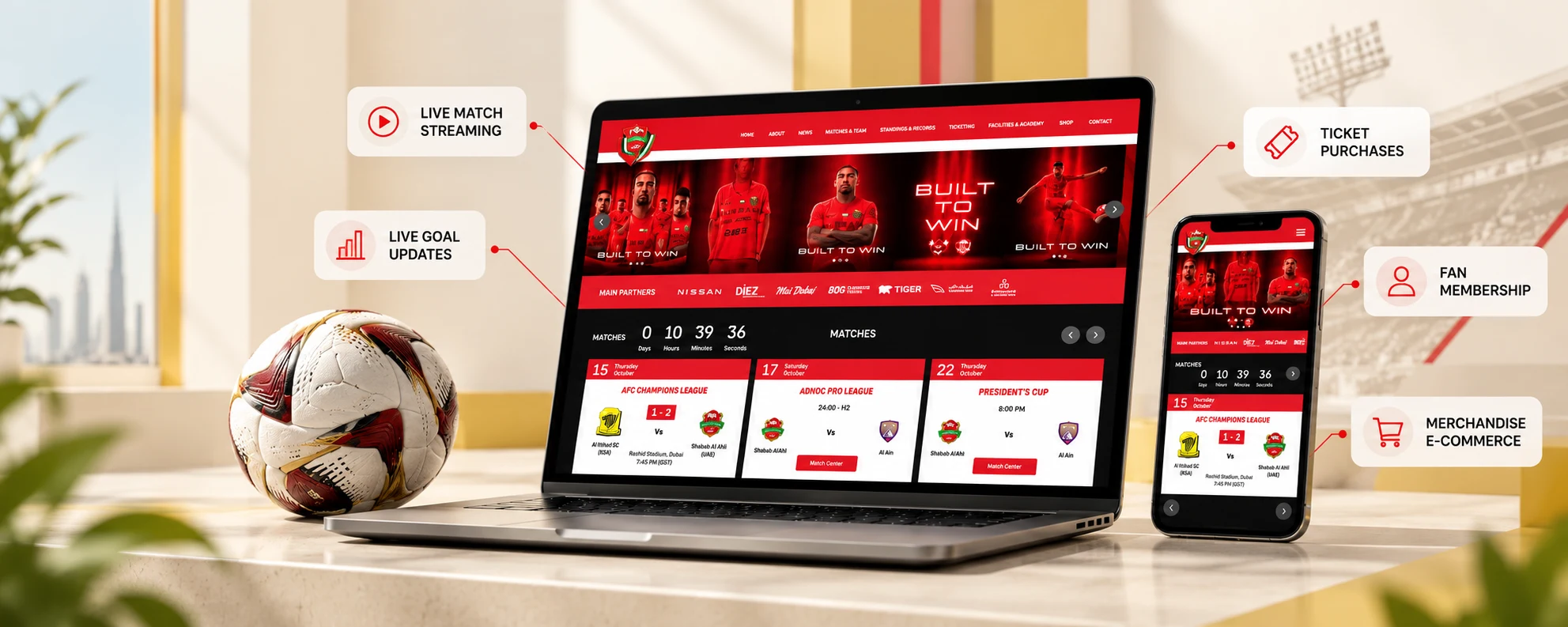
The project required several dynamic features and destinations, such as a next-match timer, match fixtures, live statistics, results, first-team information, and a merchandise section.
Each section serves a different purpose. Together, they show why a homepage needs to account for the different reasons people visit a website.
What the project demonstrates
The Shabab Al Ahli website brings together match information, first-team content, results, and access to merchandise in one digital experience.
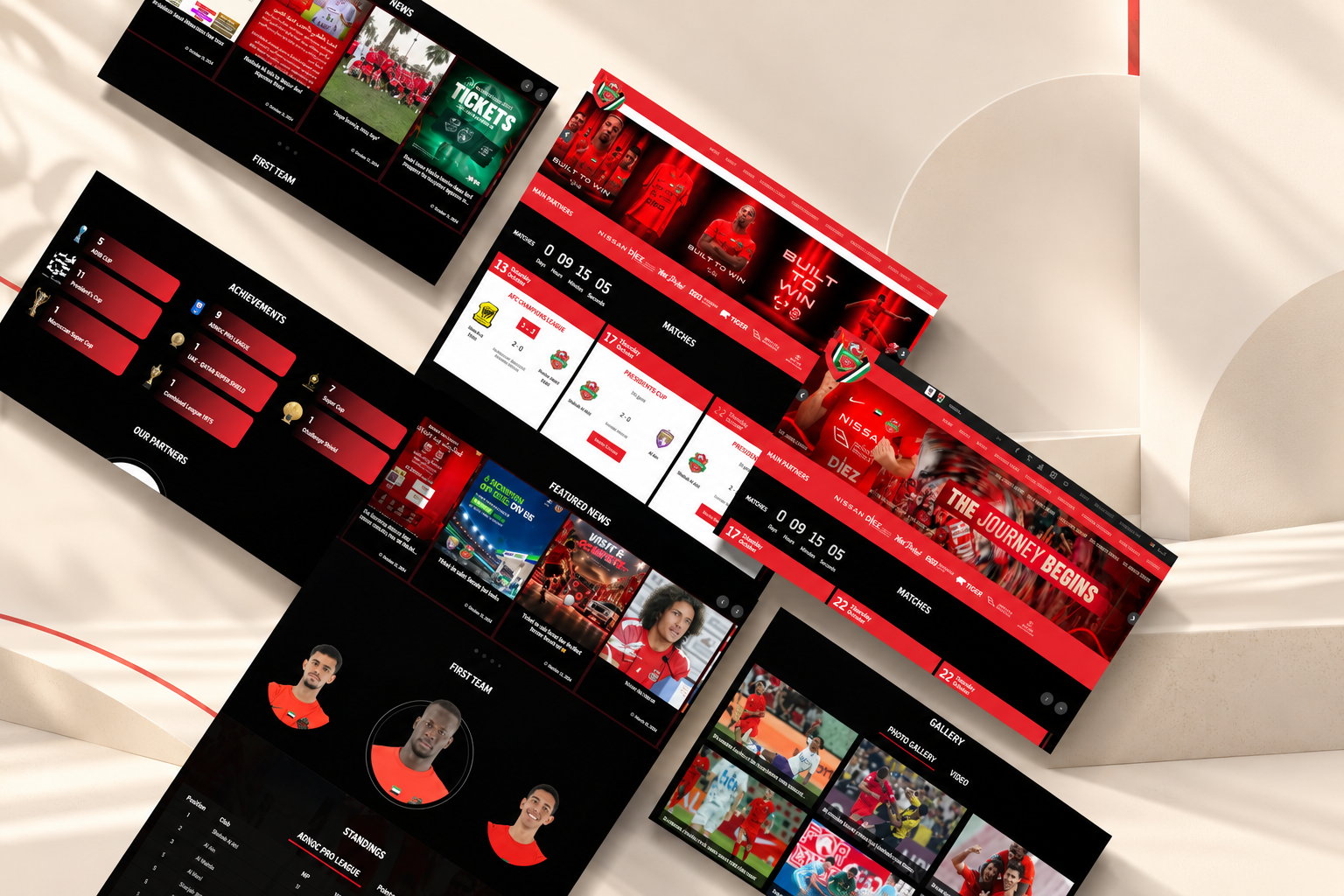
The project illustrates how one homepage can accommodate multiple visitor goals. The screenshots below show how fixtures, team information, results, and merchandise are presented. This is an example of the design approach, not a measured claim about conversion or user satisfaction.
A football club’s priorities differ from those of a retailer or a professional services company.
For businesses planning a website, start by identifying what visitors need to find, which actions matter most, and how the layout can make those tasks easier.
The main objectives of this project were as follows:
1. Making the next match easy to find
The next-match timer gives supporters a quick reference point for the upcoming fixture.
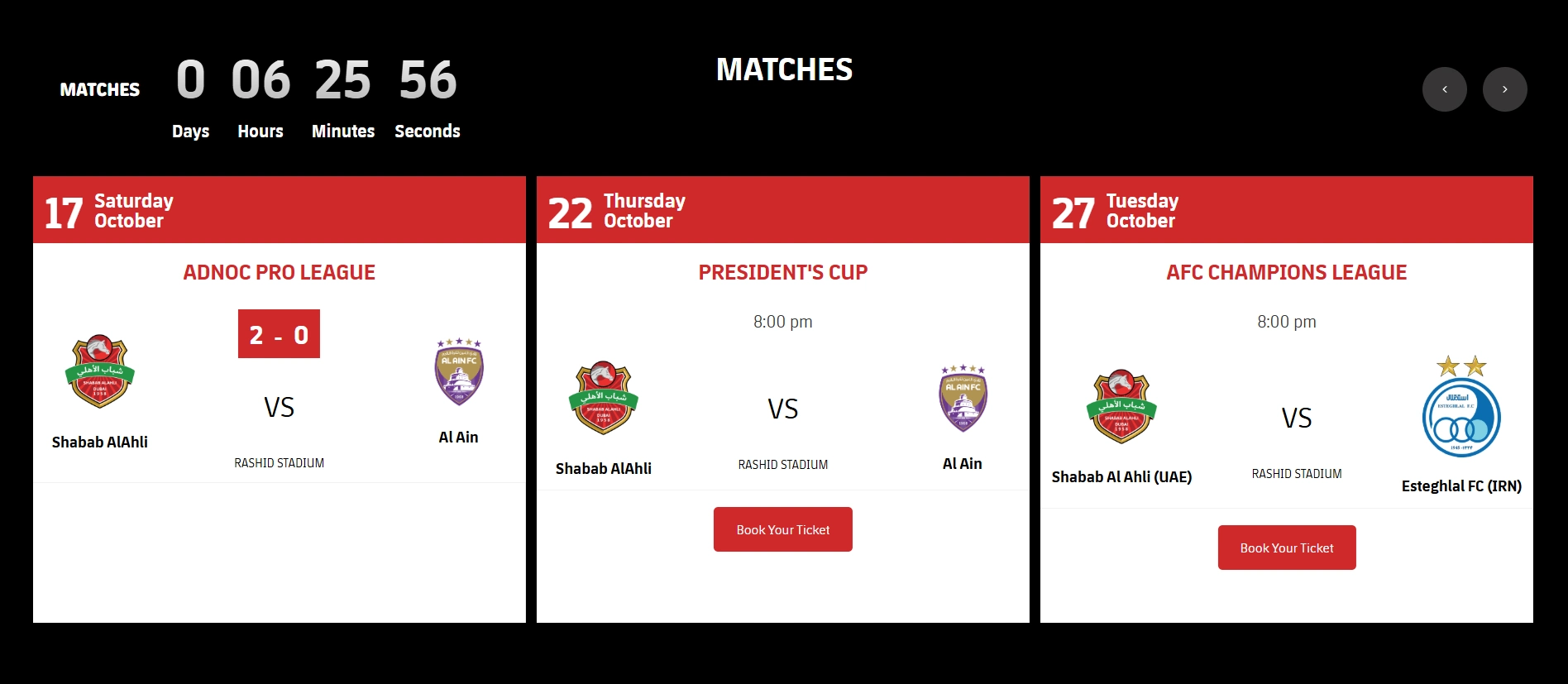
For a football club, match information is closely connected to why supporters visit the website. Making the next game easy to identify helps visitors get to relevant information without having to work through unrelated content.
The priority should come from the website’s purpose, not from a generic homepage template.
2. Bringing fixtures, live streaming, and match statistics together
Match fixtures help supporters identify upcoming games, while streaming and statistics provide additional ways to follow matches where those features are available.
The exact placement and functionality of these features should be evaluated against the way supporters use the website, rather than assuming that every match-related link serves the same purpose.
3. Making past results accessible
Results help supporters catch up on completed matches.
The same principle applies outside sports. A business may need to make completed projects, published reports, product details, or other reference information easy to access.
4. Giving first-team information a clear place
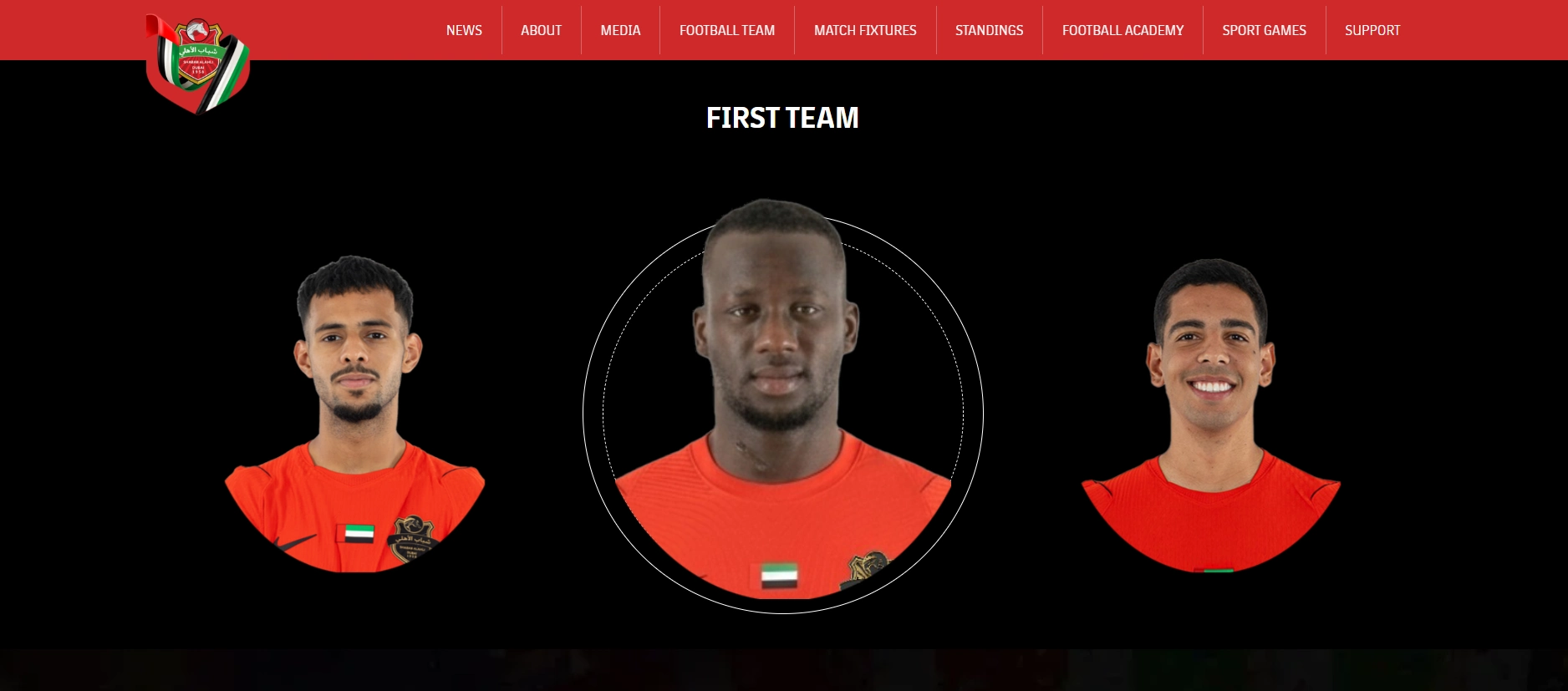
First-team information gives supporters a dedicated place to explore the squad.
Businesses can apply the same principle to their own information. A company introducing its team, products, or expertise should make those destinations easy to discover when they matter to its audience.
5. Connecting supporters with merchandise
The merchandise destination serves visitors who want to explore club products rather than match information.
Including this destination alongside fixtures, results, and team content accommodates another visitor objective. Not everyone arrives at the homepage looking for the same thing.
This illustrates an important consideration in homepage design: several visitor journeys can coexist, provided the information architecture makes them understandable and accessible.
Read the detailed Case study of Shabab Al Ahli
What Do Businesses in Dubai Need on Their Homepage?
Businesses operating in Dubai may need to consider the needs of a diverse, multilingual audience, their local customer base, and the markets they serve.
The right homepage approach depends on the business model, target customers, and whether the website serves a local, regional, or international audience.
Make local business information easy to find
For businesses targeting customers in Dubai or elsewhere in the UAE, relevant local information may include:
- A genuine business address, where applicable.
- A UAE contact number or suitable contact options.
- Service areas and location-specific offerings.
- Relevant information about local availability and business operations.
These details should reflect the actual business and help visitors establish whether the company serves their needs.
Consider language preferences
Arabic and English may both be relevant to businesses serving audiences in the UAE. The appropriate language options depend on customer research, service requirements, and the intended audience.
If a business serves customers who prefer Arabic, a properly translated Arabic experience may help them understand the offering and navigate the website.
Language selection, translation quality, and navigation should be considered as part of the overall user experience rather than added as an afterthought.
Reflect local customer needs.
Businesses should make their services, contact options, pricing information where appropriate, and next steps clear to the audience they serve.
For example, a business setup consultancy may need to explain its services and consultation process, while a retail business may prioritize product discovery, store information, and purchasing options.
The goal is to provide relevant information rather than follow a fixed homepage template for every Dubai business.
Frequently Asked Questions
What are the essential elements of a good website homepage?
A good homepage generally includes a clear value proposition, strong navigation, a logical visual hierarchy, meaningful image use, fast loading, a mobile-friendly design, trust signals, and clear calls to action.
What should appear above the fold(hero/banner section) on a homepage?
The area visible before scrolling should usually communicate the main offering and provide a clear next step. Depending on the business, this may include a headline, supporting text, a primary CTA, and a relevant image or visual. The exact layout will vary by device and audience.
How many calls to action should a homepage have?
A homepage should have a clear primary CTA, with secondary CTAs when they support different visitor needs. The number depends on the business model and the actions visitors may reasonably want to take.
How do I know if my homepage needs a redesign?
Audit your homepage to see whether visitors struggle to understand your offering, have trouble finding important pages, the mobile experience is poor, it’s not loading fast enough, or visitors have trouble completing key tasks. Analytics, usability testing, customer feedback, and technical audits can help identify these issues.
How often should you update a homepage?
There is no universal update schedule. Review the homepage when business offerings change, customer needs evolve, important information becomes outdated, performance issues emerge, etc.
Final Takeaways
A good website homepage is built around the needs of its visitors and the objectives of the business.
- Communicate clearly: Explain what you offer, whom you serve, and what visitors can do next.
- Organize information logically: Make important destinations easy to find.
- Design for usability: Use a clear visual hierarchy, readable content, and accessible controls.
- Prioritize performance: Monitor Core Web Vitals and address the causes of loading, responsiveness, and layout problems.
- Build credibility: Use genuine reviews, relevant project examples, and verifiable claims.
- Guide the next action: Provide a clear primary CTA and relevant alternatives.
- Measure effectiveness: Track meaningful actions and investigate where visitors encounter difficulties.
No single homepage layout works for every business. The most effective approach is to understand your audience, prioritize their needs, and continually evaluate how well the website supports their goals.
Planning a Website Redesign?
Inter Smart provides website design and development services for businesses and organizations across different industries.
Explore our web design portfolio to see examples of our work and how we approach different project requirements.
If you’re planning a new website or looking to improve your existing homepage, contact Inter Smart to discuss your requirements.
Sources: Google Core Web Vitals | Google Mobile-First Indexing | Statista: Smartphone Penetration UAE | Google Search Essentials: Helpful Content



Get A Call back from Our Expert
Need tailored guidance or have specific questions? Simply request a callback, and one of our knowledgeable experts will reach out to you at a time that suits your schedule.